Showing posts with label Random Info. Show all posts

Thursday, January 30, 2020

Bulb and Switch Puzzle

Statement: There is one bulb in a room with its door closed. There are 3 switches (A,B,C) outside. You can open the door only once. You have to figure out which switch belongs to the bulb.


Solution:
1) Turn on the first switch and keep it on for a few minutes.

2) Switch off the first switch and turn on second switch.

3) Immediately enter the room
      a) If bulb is on, second switch it is.
      b) If bulb is off and warm, then first switch.
      c) If bulb is off and cold, then third switch.

Saturday, December 21, 2019

Basic Unix commands of Frequent use


Following are some commands which you will use very often->

Suppose you are not able to deploy your ear successfully ,or your application is running very slowly; then most definitely you are short on space.

1) Use the following 2 commands to see the available space and memory->
$ df -h (Space)
$ free -m (Memory)

2) Check "class file" exists in which jar file.
$ find -name "*.jar" | xargs grep CitiNotesDataUtility.class

3) Find all instances of the specified process currently running.
$ ps -ef | grep processName
$ ps -ef | grep processName | grep java (java processes)

4) Kill Process : kill
$ kill -9 processId

5) List Directory Contents : ls
$ ls -a

6) Display Manual pages : man <command>
Linux has as extensive set of online documentation. They are referred to as manual pages.
$ man ls

7) Concatenate files: cat
$ cat file1 file2 > newFile

8) Current working directory
$ pwd

9) List all the current running processes
$ ps

10) Change Directory
$ cd /usr/bin
$ cd.. (go back)

11) Make Directory : mkdir
$ mkdir newDirName

12) Remove files and directories: rm
$ rm file.txt

$ rm dirName


Friday, December 9, 2016

Pair Programming

In Pair Programming two programmers work together on the same computer.

One person writes the code while the other reviews it. They also switch their roles frequently.

Both have to maintain a running commentary, basically they have to "program out loud".


Monday, May 9, 2016

Work Culture in iGATE

Worked here for 4.5 years.

Well i joined Patni Computers System and within a year of joining, this company was taken over by iGATE.

Patni had a very good work culture and there were no strict timings, even a swipe of 6 hours was considered as full day.

The campus which was famously known as PKP (Patni knowledge Park) was the best in mumbai.

iGATE bought Patni and started enforcing its policies.

Phaneesh Murthy, the then CEO of iGATE was originally from INFOSYS and thus made Patni's policies similar to INFOSYS (Less Employee Friendly).

In iGATE it was mandatory to complete 45 hours swipe every week.

Within 1 year Patni was dissolved completely and a new brand iGATE was formed.

In iGATE the ratings given during appraisal were, 1 - Needs Improvement ,2 - Meets Expectations, 3 - Exceeds Expectations and 4-Outstanding. However since they followed bell curve methodology most of the guys were given 2 rating.

Normal increments were in the range of 7% to 11% but in case of promotions the increments given were around 20% (sometimes 14% and 27%  was also given). It all depended upon your current CTC (Low CTC = High Increment and High CTC = Low Increment).

iGATE had taken a huge loan from Apax partners to buy Patni. Apax did not get the said amount within time and hence they converted their debt into shares and sold it to Capgemini at 4 times the normal price.

Thus finally iGATE became Capgemini.

During this time they were looking to keep the cost as low as possible and thus fired many employees from iGATE. They were also forcefully giving 1 Rating to many employees so that they will get 0% increment.

This was the time many employees started looking for jobs outside and i was also one of them (I switched before it became Capgemini completely) .

Overall i would summarize as follows -

Patni - Best work culture (More like family).
iGATE - Little professional (More like Infosys)
Capgemini - Very Professional (Large Organization)

Below is the photo of PKP, It has all facilities in this campus (Shopping Mall, Gym, Swimming Pool, Library, Training center, Guest House etc.)


Monday, March 7, 2016

Jasper Reports Not opening on all Environments

Sometimes your Jasper Reports work on one environment and don't work on others.

We get the following error -NoClassDefFoundError:net/sf/jasperreports/engine/util/JRStyledTextParser

If you look at the logs closely, you will get the root exception which gets thrown before the above exception.
Root Exception - java.lang.NoClassDefFoundError: sun/awt/X11GraphicsEnvironment

To solve this issue we have to set the following Argument at server start up ->
java.awt.headless=true

Java uses the underlying operating system to generate images. If you are using Unix and do not start the portal in a X Windows session, then Java will not know how to generate images and you'll get lots of nasty exceptions. Setting this property to true will fix that. Sometimes this property cannot be set dynamically when the server starts and you'll need to edit your start script to include this as a system property.

Steps ->

1) Login to weblogic console and click on servers.


2) Click on the "server" that you have configured.


3) Now click on "Server Start" Tab.


4) Add the following line (-Djava.awt.headless=true) in Arguments section as shown below.


Friday, October 30, 2015

Solution for larger numbers which get read in exponential format from excel.

When you try to read excel in JAVA and come across cells which have Numbers greater than 12 digits, it will automatically get converted in Exponential format.

Example: 104009000084 gets converted to 1.04009000084E11

Now even if you change the cell format from Number to Text, it still considers it as Number and converts it to exponential format while reading the file in JAVA.

Solution 1:
Write sign ' before the number in excel sheet.

Solution 2:
Delete the value from excel , change the format from Number to Text and then rewrite the value back to excel.


Tuesday, October 6, 2015

How to check EPF (Employee Provident Fund) balance

How much money goes in the PF (Provident Fund) Account?
  1. Employee Contribution : 12% of your Basic
  2. Employer Contribution  : 12%  of your Basic (8.33% goes to EPS)
  3. Interest on both the contribution.

What is EPS?

EPF = Employee Pension Scheme.

The purpose of the scheme is to provide for
1) Superannuation Pension:Member who has rendered eligible service of 20 years and retires on attaining the age of 58 years.
2) Retiring Pension:member who has rendered eligible service of 20 years and retires or otherwise ceases to be in employment before attaining the age of 58 years.
3) Permanent Total Disablement Pension 4) Short service Pension: Member has to render eligible service of 10 years and more but less than 20 years.


Steps to check PF Online:

1) Get your PF Account Number - It is normally mentioned on your payslip, if not check with your HR team.

It will look like MH / 98765 / 1234567

2) Go to EPFO website - http://epfindia.com/site_en/KYEPFB.php

3) Click on the following link -> "Click here to know Your PF Balance"


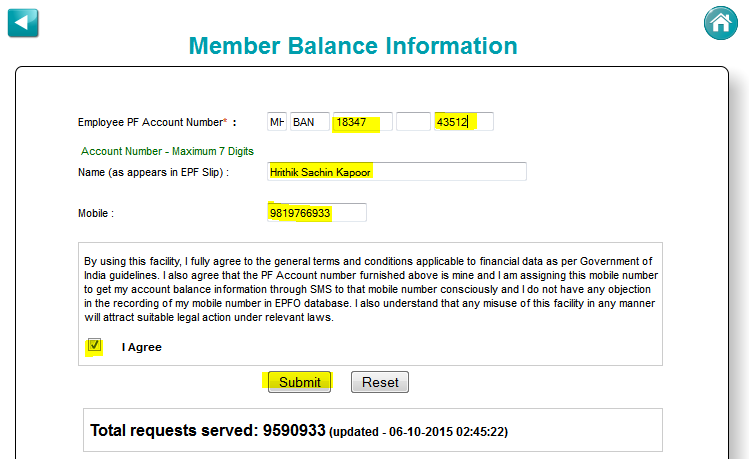
4) Select your State and Office Name as shown below.


5) Enter all the details as shown below and click on "Submit" Button.

First 2 text fields will be populated automatically.

You can keep the 4th text blank, if you dont know the extension number.


6) You will now receive an SMS from EPFO.

In the SMS, 2 amounts will be mentioned "EE Amount" and "ER Amount".

EE Amt = Employee Balance

ER Amt = Employer Balance
 

Wednesday, July 22, 2015

Agile Methodology

In Agile you have to keep deploying something to production quite frequently (every month).

This benefits the customer and developers since development becomes transparent and everyone can understand the business requirement better. Best practices can be put to use in upcoming releases by learning from the previous releases.

In order to make this work fully you need a deployment pipeline that ensures that software is built in small production-ready increments.

Nowadays Agile Methodology is best suited for development projects.

Roles defined in Agile Methodology are - Product Owner, Scrum Master and Development Team.
Product Owner owns the product and has a vision regarding that product.

Development team tries to implement that vision.

Scrum Master also plays a very important role by becoming the interface between Product Owner and Development Team. Any Impediment needs to be highlighted by the Scrum Master and if any external help is needed should be made available.

A common practice in agile projects is the short daily team meeting - called a stand-up meeting or scrum. This is supposed to be driven by the Scrum Master. Done well, these help team members coordinate their activities effectively, adding energy to the team. Done badly, they are a boring and empty ritual.

Scrum log is maintained to track the work done by every member of the development team on a daily basis.

Test Driven Development (TDD)

TDD Life Cycle

1) Write the test.

2) Run the test (There is no implementation code, test does not pass).

3) Write just enough implementation code to make the test pass.

4) Run all tests (Tests pass).

5) Refactor.

6) Repeat.


The Resulting code is -

1) Very well tested.

2) Almost self documented.

3) Easy to maintain.

4) Easy to learn by another developer.

5) Safe to refactor.
Home